Monday, August 4, 2014

Crontab Command in Linux Environment

As i learned the previous week, crontab is useful in setting events that should happen in a periodic basis , automatically if set.
Cron runs in background (Daemon) as default in linux, checks for particular default location "etc/crontab file".

Setting cron has the order as follows :

It has 5 parameters
1)minutes (0-59)
2)hours (0-23)
3)day of month (0-31)
4)month (1-12)
5)day of week (0-7)

Special Characters used :
Asterik(*) – Match all values in the field or any possible value.
Hyphen(-) – To define range.
Slash (/) – 1st field /10 meaning every ten minute or increment of range.
Comma (,) – To separate items.

Commands :
1) Login as root and type" crontab -l" -> This will list the existing root crontab list
2) To view all user entries login as "crontab -u <user> -l"
3) To edit crontab "crontab -e" -> This will deafult edit the currently login user's default crontab ( /tmp/file will be open for editing)
4) To remove currently running / created crontab -> "crontab -r"

Sample setting of a crontab :
  • *17 * * 1 date >> ~/testCron.log
    --> This will set cron for every monday(0 index for sunday) 5 p.m. We can pass the value printed to a log file and can trace the execution.
  • */10 * * * * date >> ~/testCron.log
    --> This "*/10" part means this will execute for every 10 minutes
    So we can wait for 30 minutes and check it the logfile is update 3 times, for every 10 minutes.


Tuesday, July 1, 2014

Linux -> Running low on Disk Space -> Mysql Data Binaries

Mysql data binary logs

Mysql binary logs contains records of changesthat affects the database and its  actual data.
It stores delete, update operations, where binary logs allow mysql to recreate events in future.

Since the binary logs contain all data changing events, it is possible to recover changes which occurred after a database dump was created.
 
Issue with these logs

Unfortunately, binary logs do not have a default expiration in mysql.
This means that binary logs are constantly generated, but never removed. This is of concern because the binary logs are not small, and will soon take up a significant amount of space on disk.
The first indication of this is usually " low disk space ".

 Default linux location of these binaries : /usr/local/mysql/data


What i performed to fix the issue is :
  • Took dump of mysql database
  • Cleared the binaries
  • Created the new mysql user, database again and sourced the sql

What actually need to be performed is

 --> Purge old, unneeded binary logs

Steps to perform

1) Type in console : 
 mysql> SHOW SLAVE STATUS \G;

This would show an output like follows :

************************** 1. row ***************************
               Slave_IO_State: Waiting for master to send event
                  Master_Host: 10.0.132.10
                  Master_User: repl
                  Master_Port: 3306
                Connect_Retry: 60
              Master_Log_File: mysql-bin.000074
          Read_Master_Log_Pos: 1003370983
                        etc.

 2) If same as here if Slave_IO_state is still in reading state,it is safe to remove any logs created prior to the oldest one being read by replication slaves.

On the Replication master :


mysql> PURGE BINARY LOGS TO 'mysql-bin.000074';

Alternatively, logs prior to a certain date can be removed:

mysql> PURGE BINARY LOGS BEFORE '2011-01-01 00:00:00';

Note
This only takes care of the immediate excess of binary logs.
It does not prevent them from accumulating and resulting in low disk space again. To prevent this, the mysql global variable "expire log days" should be set. This variable determines how many days the binary logs are kept before being automatically purged.
By default it will be set to "0"

3)set expire log days

mysql> SET GLOBAL VARIABLE expire_logs_days=10;

 And also set mysql conf file : /etc/my.cnf


[mysqld] 
expire_logs_days = 10

Setting this variable will cause MySQL to automatically purge binary logs older than the number of days specified in the variable.


No we can check  the list of binary logs maintained by mysql by running


mysql> SHOW BINARY LOGS;
 
If the log files are not listed here,then successfully purged.

Reference -->
http://dev.mysql.com/doc/refman/5.0/en/purge-binary-logs.html


Thursday, June 19, 2014

Out of memory Issue in Tomcat

Description of Exception 
(Tomcat – java.lang.OutOfMemoryError: PermGen space)

The exception happens in web application deployment in tomcat.
Default settings memory space will not be adequate for some search information requirements.


If we check the tomcat error log, we might caught-up the issue as follows :


Solution for Linux environment

1) Find out catalina.sh file in tomcat bin folder
           
2) Check for class path settings.
    Use setenv.sh instead to run the environment variable
    Set as follows :
   CLASSPATH=
 
    if [ -r "$CATALINA_BASE/bin/setenv.sh" ]; then
     . "$CATALINA_BASE/bin/setenv.sh"
    elif [ -r "$CATALINA_HOME/bin/setenv.sh" ]; then
     . "$CATALINA_HOME/bin/setenv.sh"
    fi
 
3) Check for setenv.sh in tomcat bin folder
    Check if it is there, if not create manually and enter the following to it.

export JAVA_OPTS="-Dfile.encoding=UTF-8 -Xms128m -Xmx1024m -XX:PermSize=64m -XX:MaxPermSize=256m"

4) Restart Tomcat


Saturday, June 14, 2014

Generating keytool  for SSL configuration in Linux Command 


  • Navigate to the directory where we need to save your keystore file
  • Then type the following commands in the shell
  1. keytool -genkey -alias <name> -keyalg RSA -keypass changeit -storepass changeit -keystore keystore.jks
    (Note : Here name would be "tomcat" as default for the first time use.. If we need to create more than one keystore, then can use any name. If so, the name should be mentioned in tomcat server.xml)
  2. keytool -export -alias <name> -storepass changeit -file server.cer -keystore keystore.jks
  3. keytool -import -v -trustcacerts -alias <name> -file server.cer -keystore <path-to-jdk>/jre/lib/security/cacerts -keypass changeit -storepass changeit

  •  Then change the tomcat "server.xml" accordingly
    <-- Define a SSL Coyote HTTP/1.1 Connector on port 8443 -->
    <!--
    <Connector 
               port="8443" maxThreads="200"
               scheme="https" secure="true" SSLEnabled="true"
               keystoreFile="<keystore saved path>.keystore" keystorePass="changeit"
               clientAuth="false" sslProtocol="TLS"/>
    -->
       
  (Note : If you are using different port for https access then change port accordingly in server.xml) 
  •  Now we can access the deployed application securely. 
  • Go to the browser and type
    https://localhost:<configured-port-number> ie: here it is 8443

Saturday, June 7, 2014

Testopia and Bugzilla

Accessing Testopia

Any Bugzilla user can access Testopia by clicking on the "Product Dashboard" inside the main Bugzilla page


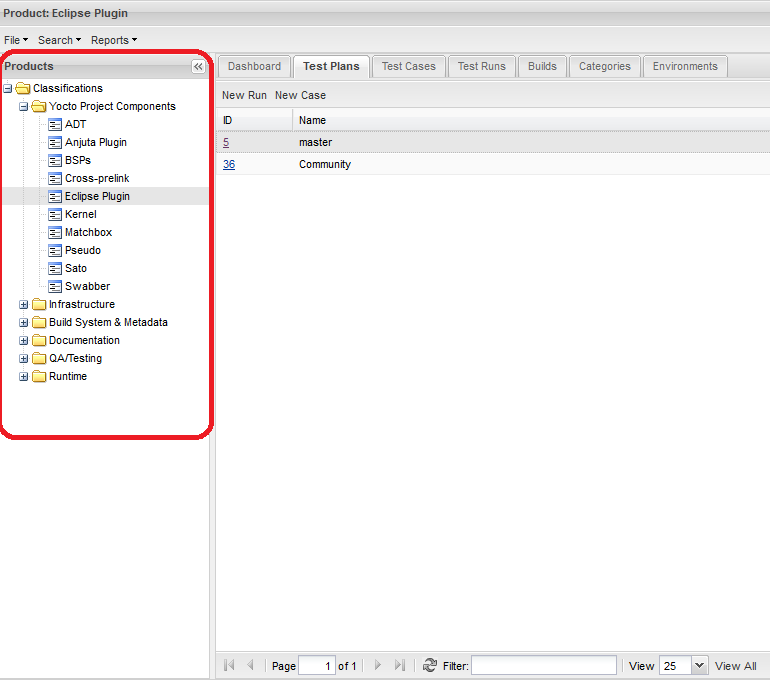
Products


The products in Testopia are imported from Bugzilla and are basically the products of the Yocto Project. These products can be seen in the left column of Testopia main page:


By clicking on a product you will see detailed description about it like the Test Plans it contains, the test cases and so forth.

Test Plans

  • test plans are unique to the product they belong to and can not be shared between products.
  • test plans contain all the test cases relevant to the product they belong to.


Test Cases

  • test cases can not be shared between products.
  • test cases can be shared between test plans within the same product.
  • test cases have 2 special fields assigned to them: priority and category.
  • test case priorities are linked to Bugzilla and affect bugs filed from the test case.

Test Runs

Test runs hold the results of how certain test cases fared in a specific build and environment. They are composed of Case Runs.
  • test runs are unique to a specific product.
  • test runs can not be shared between products.
  • test runs are unique to the test plan they belong to.

Bug Life Cycle States:

  • New - Potential defect that is raised and yet to be validated.
  • Assigned - Assigned against a development team to address it but not yet resolved.
  • Verified - The Defect that is retested and the test has been verified by QA.
  • Closed - The final state of the defect that can be closed after the QA retesting or can be closed if the defect is duplicate or considered as NOT a defect.
  • Reopened - When the defect is NOT fixed, QA reopens/reactivates the defect.

Bug Severity stages: 


SeverityDefinition
blockerPrevents function from being used, no work-around, blocking progress on multiple fronts
criticalPrevents function from being used, no work-around
majorPrevents function from being used, but a work-around is possible
normalA problem making a function difficult to use but no special work-around is required
minorA problem not affecting the actual function, but the behavior is not natural
trivialA problem not affecting the actual function, a typo would be an example

Bug Priority levels:

  • Urgent: Must to be fixed before any other high, medium or low defect should be fixed. Must be fixed in the next build.
  • High: Must be fixed in any of the upcoming builds but should be included in the release.
  • Medium: should take precedence over low priority defects and may be fixed after the release / in the next release.
  • Low: Fixing can be deferred until all other priority defects are fixed. It may or may not be fixed at all.


Tuesday, June 3, 2014

Python+Regular Expression

By using Regular Expression we embed it into python-script and provide some string literals insearch of any pattern match with files.

Here we can question like "does the given string match with the pattern?"

Matching Characters
   '.'         Matches any character except a newline
   '^'                  Matches the start of the string
   '$'                  Matches the end of the string /  before the newline
   '*'                  eg: ha* will match ‘h’, ‘ha’, or ‘h’ followed by any number of   ‘a’s.
   '+'                  eg: ha+ will match ‘h’ followed by any non-zero number of ‘a’s
   '?'

*?, +?, ?? greedy match.where +,?,* looks for all possible matches of string  in entire text given.
   {m}    eg: a{6}will match  six 'a' characters not less than it
   {m,n}   eg: a{3,5} will match from 3 to 5 'a' characters.
   '\'      Escapes special characters ('*', '?').

   []     Indicate a set of characters  in a set:
     e.g. [amk] will match 'a', 'm', or 'k'


Sunday, June 1, 2014

Fourth Week

Taking "diffs" for 2 files in linux:
               diff <path for file1><space><path for file 2>

Sourcing .sql files from a location to our db :
               1) scp <filename> user@hostip:<path to save this file in our machine>
               2) go to the file saved directory
               3) run mysql from that directory as : mysql -u root -p<password> and press enter
               4)select the database wher to source the files > use database; so now you moved into the database and then type "source <filename.sql>"

python
Reading file using python script
path = raw_input("Enter path to log file \n")
log = open(path)


In case of getting user input of a timestamp
yyyy,mm,dd,hh,mm = raw_input("Enter Start_Time in format(yyyy,mm,dd,hh,mm)").split(',')

use regular expression to get contents from a file
import re
re.search('^5', line)  ## this will get lines start with 5

python operations with "list"

eg : a=[66,333,333,1,1234] # a list of int
       print a.count(333) #result 2
       a.append(333)       #add element '333' to end of list
       a.reverse()             #reverse elements
       a.sort()                   #will give a sorted array of ascended values

python - defining a function and call function

eg: #print numbers in range which divisible by 2 and 3
#lets define a function def(fx)

def f(x): return x%2!=0 and x%3!=0
res=filter(f, range(0,1000))
print res